

Earlier this year, Facebook launched Offers for Pages, letting businesses on Facebook share deals with fans. Users could claim offers from their Facebook news feeds and redeem the vouchers at stores to get discounts.
Last week, Facebook announced several changes and additions to the Offers feature. Changes include:
- Offers are now available worldwide to all Pages with more than 400 Likes.
- Merchants can add a bar code to an Offer so they can track results more easily.
- Only the first time you try Offers, it’s free. After that a budget is required. The amount you pay is based on how many people you want to reach.
Creating Your Offer: Step-by-Step
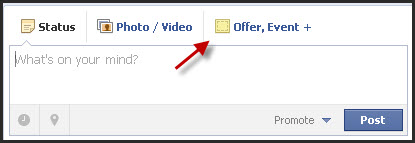
First, visit your practice’s Facebook page. If you have 400+ Likes, at the top of your timeline, where you post status updates, choose the option to create an offer.
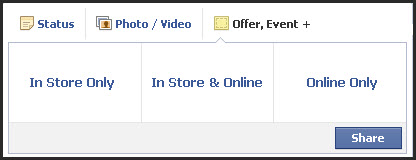
Once you choose “Offer” you’ll be given three options to choose from. Decide whether you want your Offer to be “In Store Only,” “In Store and Online,” or “Online Only.”
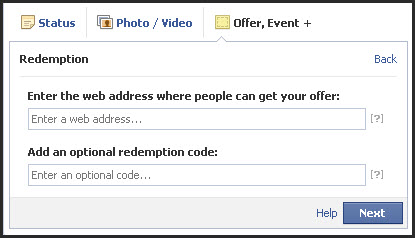
For online offers: You can provide the web address where users can redeem your offer with an optional redemption code. We recommend using a redemption code so you can track the success of your online Offer.
Then, you’ll be prompted to upload a thumbnail image (90 x 90 px) and write a headline in 90 characters or less. You’ll also be asked to choose a limit for the number of claims, an expiration date and add terms and conditions. You can also add a barcode number to track in-store purchases.
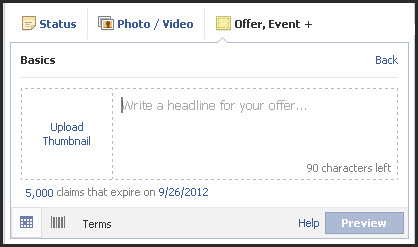
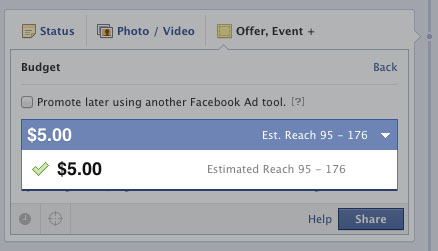
Lastly, hit preview to view your Offer. Review and click “Back” to make changes. Once you’re happy with your offer, you’ll be asked to set a budget. Please note you can also choose to promote your offer with a Facebook ad.
Frequently Asked Questions!
How can a patient redeem my Offer?
Each time a potential patient clicks Get Offer, your offer will be sent to their email address associated with Facebook. When they come to your location, they can redeem your offer by showing it in printed form or on their mobile phone. If the offer is online, they can visit the given web address and plug-in your redemption code.
How much does it cost?
Your first offer is free of charge, after that a budget is required. The amount you pay is based on how many people you want to reach. After you create your offer, you’ll be prompted to set a budget. Please note you can also choose to promote your offer with a Facebook ad.
Tips for Designing a Successful Facebook Offer
Keep it Simple: Make sure your headline and terms & conditions are straightforward. If patients are confused, they may not claim your Offer.
Chose an Appealing Image: Choose an image that demonstrates your offer and make sure it’s clear when viewed at thumbnail size.
Make Discounts Significant: Make an Offer your patients can’t refuse. A few good examples:
- “$100 Off Teeth Whitening!”
- “20% Off Botox®!”
- “Buy One Skincare Product, Get One Free!”
Track Success: New features allow you to add a barcode to in-store offers and an online redemption code for online offer. Facebook Offers also provides you information on how many people claimed your offers. Keep track of redemptions and keep your staff aware of offers as well.
For more information about Facebook Offers, visit Facebook’s Help Center.
Create your Facebook Offer Today!
Creating your Offer is a cost-effective and simple way to draw in more business. Don’t have 400+ Likes? This is a great incentive to start promoting your Page. Start today and watch your business grow!
Still not on Facebook?
Now is the time! Let MyAdvice launch and manage your social media campaign. We’ll plan and execute a cohesive social media strategy for your practice and get potential patients talking! Contact an MyAdvice Representative to learn more.


